
Lysora Technology
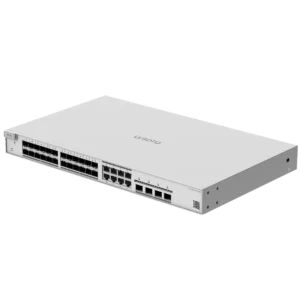
LS3-24SFP/8GT4XS
Login for PricingThis is a 24-port Layer 3 switch with 24 × SFP ports (8 × combo ports) and four 10G SFP+ ports. It’s designed to serve as the core switch in a network and supply data…
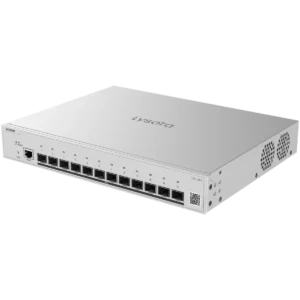
LS3-12XS
Login for PricingThis is a Layer 3 switch with 12 × SFP+ (10 Gigabit) ports. It’s designed to serve as an aggregation switch and supply data to other switches. It doesn’t have built-in PoE, but it does…
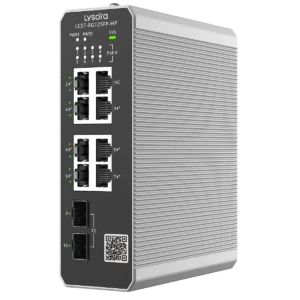
LCST-8GT2SFP-HP
Login for PricingThis is an 8-port managed industrial PoE switch with two SFP ports. It supports PoE++ on a single port and PoE+ on the other 7 ports – with a total PoE budget of 300 W.…
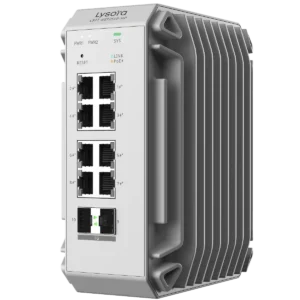
LS2T-8GT2SFP-HP
Login for PricingThis is an 8-port Layer 2 managed industrial PoE switch with two SFP ports. It supports PoE+ on all eight ports – with a total PoE budget of 240 W. It’s rated for -40°C to…
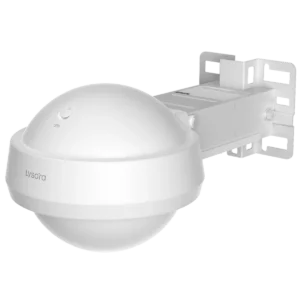
L6Pro-T
Login for PricingThis is an outdoor Wi-Fi 6 AP, designed for medium to high-density projects. It has 4 spatial streams, supports up to 512 simultaneous users, and has a coverage area of 200 m².
What types of products does Lysora have?
Lysora is a networking equipment manufacturer. In terms of market position, they occupy a similar space as Ubiquiti and TP-Link Omada. Their equipment is designed for professional projects, such as commercial CCTV installation and reliable business networks.
They currently have four main product lines:
In general, Lyosra offers a better value compared to other networking companies – while also providing excellent hardware and software.
For example, their 16-port managed PoE switches has a generous 250 W power budget – whereas a similar switch from TP-Link only has a 150 W budget (while also costing more).
Lysora Routers
Lysora currently offers three different models of router:
- LR100G – Budget 5-port gigabit router
- LR300G-P – Standard 10-port gigabit router with 8 PoE+ ports
- LR1500XS – Performance router with 4× 2.5 Gig ports, 4× 1 Gig ports, and 2× 10 Gig SFP+ ports
All of their routers have essential business features, such as multiple WAN ports for backup internet and built-in VPNs including WireGuard and OpenVPN.
Watch this video to see a real setup and deployment of Lysora routers:
Lysora Managed PoE Switches
Switches are the backbone of your network, so it’s important to choose one with sufficient hardware to support all your devices without any bottlenecks.
Most of Lysora’s switches also supply power to devices, which makes them great to pair with security cameras and VoIP phones. You can tell it’s a PoE switch based on the -P or -HP at the end of the part number
-P means the device supplies PoE+ (30 W) to connected devices, while -HP have higher power PoE++ ports – which can supply up to 60 W of power for high-end PTZ cameras or enterprise wireless access points.
Here’s a breakdown of the various switch tiers available:
- LCS Series – Entry level PoE+ switches that allow for remote management (reboot individual PoE ports), plus a long-range mode for up to 250 metre cable runs, and a PoE watchdog feature that automatically reboots the port if no data is detected for a certain period of time (adjustable from 90 – 1800 seconds).
- LS2 Series – Layer 2 switches that support QoS, IGMP snooping, spanning tree protocols (STP, RSTP, and MSTP), and a detailed syslog with packet capture.
- LS2P Series – Layer 2+ switches support static routing, allowing devices from separate VLANs to communicate with each other – without needing to go through a router. These switches also have multi-gigabit ports and SFP+ 10 Gig uplinks.
- LS3 Series – Layer 3 switches support advanced features, such as being able to act as a DHCP server to give IP addresses to connected devices. They also support VCS (virtual chassis stacking), which lets you connect multiple switches together and manage them as if they were a single switch.
Lysora also sells industrial PoE switches, which can be installed in an outdoor enclosure without a heater – since they can operate in temperatures as low as -40°C.
Lysora Wi-Fi Access Points
Wireless access points are essential in providing reliable Wi-Fi coverage in any building or office larger than 1,000 sqft. They can be powered via a single Ethernet cable, and are usually installed on a drop-ceiling.
All of Lysora’s wireless APs support enterprise features, such as per SSID and per client rate limiting. They also support Wi-Fi VLAN – allowing you to isolate clients on a specific SSID. For example, you can create an SSID just for IoT network devices, preventing them for accessing the rest of your network.
Lysora has both Wi-Fi 6 and Wi-Fi 7 access points. In general, we recommend Wi-Fi 6 for most scenarios – since they are cost-effective and fast enough for the majority of use cases.
Wi-Fi 7 is a suitable choice for customers who want to invest in the latest technology and have the budget to support it.
In our office, we’ve been using the Lysora L6Lite for the past year without any issues. With a 40 MHz channel width on the 5.8 GHz network, we average about 350 Mbps download and upload speed on our mobile devices – which more than enough for our requirements.
Lysora Wireless Bridges
Lysora has a variety of P2P bridges for long-range networking. They are similar to Ubiquiti’s nanobeams, allowing you to bridge multiple locations together wirelessly.
These models include the CPE3-P and the CPE5. For security cameras, we recommend using the CPE3-P, since it has a PoE input and two PoE outputs – allowing you to connect cameras directly to the bridge for power and data. This simplifies installations and saves you from needing to buy a separate PoE switch just for the cameras.
The CPE5 is a more powerful bridge, with a maximum range of up to 5 km – and an Gigabit LAN ports for high bandwidth applications. It’s suitable for bridging internet across a long-distance – but not as good for cameras since it does not have PoE outputs.
There’s also the Base5i, which has a 120° wide horizontal beamwidth and can accept 16 transmitters paired to a single device. You can use a single Base5i for large projects, such as a site with numerous CCTV cameras installed across multiple buildings.
You can watch this video for a full explanation of Lysora’s wireless bridges:
Where can I buy Lysora Equipment?
If you’re located in Canada, you can buy Lysora equipment directly from us at XLR Security. We keep Lysora products stocked on the shelf, in case you need to grab something quickly for a project.
We also offer same-day shipping across Canada, so you can get equipment delivered to your doorstep within a day if you’re located in the GTA, Ottawa, or Montreal. Other locations may take longer, depending on your city and province.
If you have any questions or would like to place an order, please contact us directly. We’re open Mon – Fri, 9 AM to 5 PM.